Coaching website checklist: what every independent coach needs
A practical checklist for coach websites: services, proof, photos, reviews, blog posts, legal pages, and a request flow people can trust.
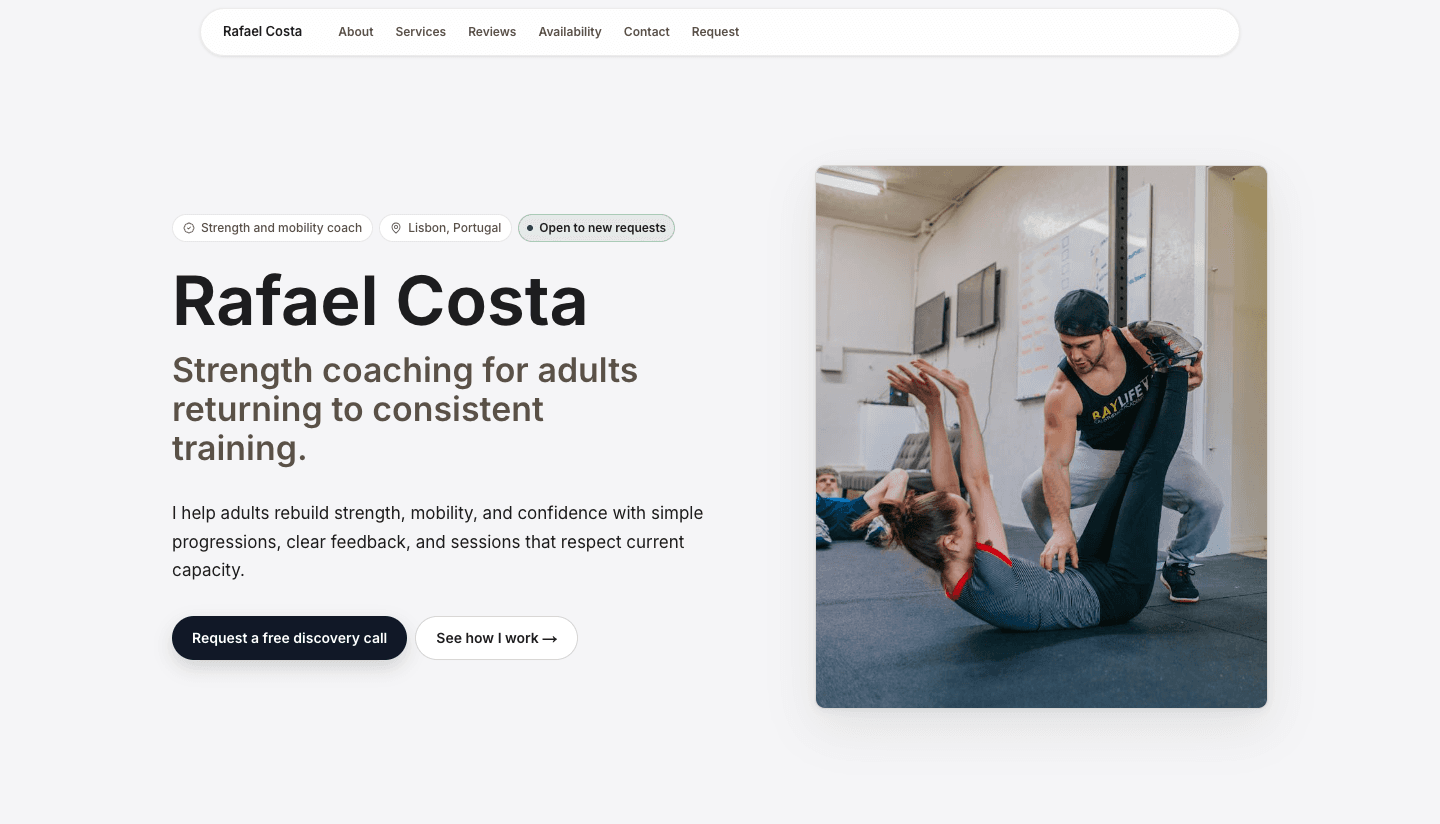
The job of a coaching website is trust
A coach website does not need to behave like a marketplace, a membership platform, or a scheduling system. Its first job is simpler: help a serious prospect understand who you help, what you offer, why you are credible, and how to ask for the next step.
That means the page should be direct. A visitor should not have to decode an Instagram bio, scroll through old posts, or send a vague message before they know whether you are a fit.
Above the fold
The first screen should answer the basic fit question. If a runner, founder, musician, nurse, or athlete lands on the page, they should know quickly whether the coach works with people like them.
- Your name and coaching discipline.
- Who you help in one clear sentence.
- Your location or service area when it matters.
- A real portrait or session photo.
- One primary request action.

Pages and sections worth including
A coaching website can be a single strong page at first, but it still needs the right sections. The visitor should be able to move from fit, to offer, to proof, to practical details, to request without leaving the page.
As the practice grows, separate pages can help: service pages for distinct offers, blog posts for recurring questions, event pages for clinics or workshops, and legal pages for terms, privacy, and cancellation expectations.
- Homepage or public profile: the main decision page for new prospects.
- Services: the offers, format, price context, and who each service is for.
- About: coaching judgment, experience, credentials, and the story behind the work.
- Reviews and proof: testimonials, Google reviews, results, photos, and press when relevant.
- Blog posts or resources: useful answers to common pre-session questions.
- Legal and practical pages: terms, privacy, cancellation, location, and payment expectations.
Services that make the next step obvious
- Name the service in plain language.
- Explain who it is for.
- Show format, cadence, duration, and price when possible.
- Say what happens after someone sends a request.
Fictional example
Mila Verhoeven, running coach in Utrecht
Mila does not lead with 'personal coaching for every runner.' Her service cards separate first-half-marathon coaching, injury-return blocks, and race-plan reviews.
- Each card says who it is for and how long the block runs.
- Prices are shown as ranges so prospects can self-select before asking.
- The CTA says 'Send a request' because Mila still approves fit before confirming the first session.
Proof people can evaluate
Use proof that a prospect can understand without needing insider context: testimonials, Google reviews, credentials, the coach's own results, press, partners, events, and useful blog posts. The best proof is specific and tied to real work.
- Reviews and testimonials should sound human, not polished into slogans.
- Credentials should include the institution or federation.
- Results should include honest provenance: event, discipline, date, or context.
- Photos should show the coach, the setting, or the work.
Weak proof
I help athletes unlock their potential.
This sounds positive, but it gives the visitor nothing to evaluate.
Better proof
Six runners completed their first 10K after a 10-week beginner block in spring 2026.
This gives the result, context, and timeframe without promising that every future runner will get the same outcome.
Content that supports the decision
A small blog can answer the questions prospects keep asking before the first call. This is useful for search, but it is also useful for sales. A clear answer can reduce hesitation before someone sends a request.
The best coach website content is not generic advice. It answers a question tied to a real service: how to prepare for a first session, what a beginner block includes, how pricing works, when to start before an event, or what makes someone a good fit.
- Write one article for each question that repeatedly comes up before a request.
- Link each article back to the relevant service or request section.
- Use examples, checklists, and plain language instead of abstract motivation.
- Keep claims grounded, especially for health, performance, career, or financial outcomes.
The request flow
Coloseos keeps the request flow direct. Visitors submit a request on the public site. The coach gets an email, the request lands in Inbox, and requested times can move into Calendar after confirmation. Payment ownership stays with the coach: Stripe link, bank transfer, invoice, SumUp, or another preferred provider, with no Coloseos booking cut.
SEO checklist for the page
SEO for a coach website starts with the same material that helps a human visitor decide. Search engines need clear titles, headings, service language, local context, crawlable content, and internal links. Prospects need the same things, just in more human words.
- Use a title that includes the coaching discipline and audience.
- Mention the real location, service area, or remote format when it matters.
- Name services in words prospects would actually search.
- Add internal links from articles to services and from services to the request section.
- Use descriptive image alt text for portraits, session photos, and examples.
- Keep the page crawlable and avoid hiding essential service copy inside images.
Maintenance checklist
A coach website should not be rebuilt every month, but it should not sit untouched for a year either. A small monthly review keeps the page accurate and gives search engines fresh, useful signals.
- Update availability, locations, prices, and service fit notes.
- Add one new review, testimonial, result, event, or article when available.
- Remove offers that are no longer open.
- Check that request forms, emails, and links still work.
- Refresh photos when the current images no longer match the real practice.
How Coloseos helps
Coloseos brings Site, blog posts, programs, events, reviews, legal pages, Inbox, Calendar, Athletes, Insights, Grow, and Colos-AI drafting into one coach workspace. It does not replace the relationship between coach and athlete.